GitHub App Authentication in Go: JWTs and Installation Tokens
GitHub provides several ways to authenticate API requests. This workshop focuses on GitHub Apps: applications that receive controlled access to selected repositories and organizations through their own bot identity.
A traditional OAuth flow produces a user token. That token inherits the user’s access, rate limit, and lifecycle. A GitHub App installation token represents the installed app. It keeps working when the installer leaves, can be limited to selected repositories, and attributes API activity to the app bot.
This workshop implements the GitHub App path. OAuth stays in the comparison because the identity choice affects permissions and attribution.
GitHub App or OAuth?
flowchart LR
    Need{Who should act?}
    Need -->|Automation| App[GitHub App]
    App --> JWT[Sign app JWT]
    JWT --> Install[Mint installation token]
    Install --> Bot[Act as the app bot]

    Need -->|A person| OAuth[OAuth user flow]
    OAuth --> User[Receive user token]
    User --> Person[Act with the user's access]
| Concern | GitHub App installation | Traditional OAuth flow |
|---|---|---|
| Identity | The app bot | The authorizing user |
| Initial authorization | Owner installs the app | Each user authorizes the app |
| Repository access | Only repositories selected during installation | Repositories available to the user and requested scopes |
| Permissions | Fine-grained read/write permissions | Broader OAuth scopes |
| Lifecycle | Independent of the installing user | Changes when the user loses or revokes access |
| Token lifetime | Installation token expires after one hour | User-token lifecycle must be managed |
| Rate limits | Scale with installation size | Consume the user’s rate limit |
| Best fit | Bots, CI, repository and organization automation | User-attributed actions and user-specific data |
A GitHub App can also ask a user to sign in and issue a user access token. Use that token when GitHub must apply the signed-in user’s permissions or attribute the action to that user. Examples include showing their notifications or creating a comment on their behalf. This workshop uses installation tokens, so its API calls are made by the app bot.
What you will build
- Register a GitHub App with minimal permissions.
- Sign a short-lived JWT that proves the app’s identity.
- Exchange that JWT for an installation token.
- Read app metadata, organization metadata, and accessible repositories.
- Display the results in a small browser console while credentials remain on the server.
The credential chain has two links:
| Credential | Purpose | Lifetime |
|---|---|---|
| App JWT | Authenticate the GitHub App to app-level endpoints | At most 10 minutes |
| Installation token | Access resources granted to one installation | 1 hour |
The private key, JWT, and installation token remain on the Go server. The browser receives display data only.
Before you start
You need Go 1.26 or newer, a GitHub account, a browser, and two terminals. Expect about 35 to 45 minutes from an empty folder to the running dashboard.
For the organization panel, install the app on an organization and set GITHUB_ORG. Personal-account installations can leave GITHUB_ORG empty. The app metadata and repository panels will still work.
Checkpoint 1: register the app
Win condition: the app is installed and its private key is ignored by git.
Step 1: create the project
mkdir ghappworkshop
cd ghappworkshop
git init

go mod init ghappworkshop
go get github.com/golang-jwt/jwt/[email protected]
go get github.com/joho/[email protected]

mkdir -p cmd/ghapp internal/githubapp static data .vscode

touch .gitignore .env .env.example data/.gitkeep \
  cmd/ghapp/main.go \
  internal/githubapp/app.go \
  internal/githubapp/client.go \
  internal/githubapp/config.go \
  internal/githubapp/helpers.go \
  internal/githubapp/installation.go \
  internal/githubapp/jwt.go \
  internal/githubapp/middleware.go \
  internal/githubapp/organization.go \
  internal/githubapp/routes.go \
  .vscode/launch.json \
  static/index.html static/app.js
module ghappworkshop
go 1.26.0
require github.com/golang-jwt/jwt/v5 v5.3.0
require github.com/joho/godotenv v1.5.1Write .gitignore before downloading the private key:
.env
*.pem
data/*
!data/.gitkeep
Fill .env.example:
# Copy this file to .env and fill in values from the GitHub App settings.
GITHUB_CLIENT_ID=
GITHUB_PRIVATE_KEY_PATH=./data/your-app.private-key.pem

# Required for the organization card.
GITHUB_ORG=

# Optional: debug, info, warn, or error.
LOG_LEVEL=info
Then create the ignored local file:
cp .env.example .envStep 2: create and install the GitHub App
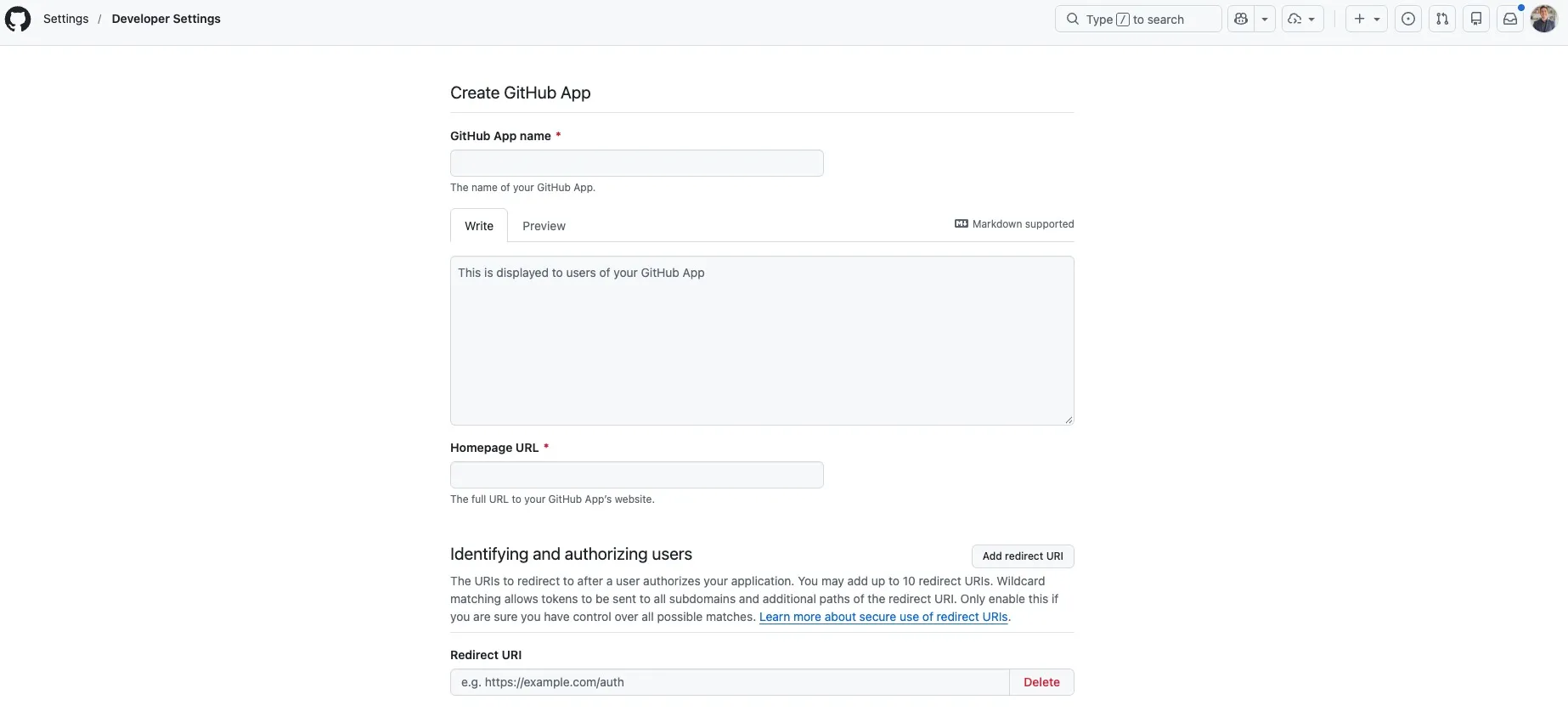
Open Settings → Developer settings → GitHub Apps → New GitHub App.
Basic settings
- Give the app a unique name, such as
installation-token-workshop-yourname. - Set Homepage URL to
http://localhost:8080. - Leave the callback URL blank. User authorization is outside this workshop.
- Leave Request user authorization during installation unchecked.
- Leave Device Flow disabled.
Webhooks
Disable Active for this local workshop. Production apps should use installation webhooks; we return to that later.
Permissions
Keep the default Metadata: read-only repository permission. It covers the three read-only endpoints used here. Add permissions when the app has a concrete use for them.
Create the app, then:
- Copy its Client ID into
.env. - Generate a private key.
- Move the downloaded
.pemfile intodata/and updateGITHUB_PRIVATE_KEY_PATH. - Install the app on an organization (or personal account).
- Choose one or two repositories. Repository selection is one of the GitHub App model’s main benefits.
- Put the organization login in
GITHUB_ORG. Personal-account installations can leave it blank; the organization panel will report that configuration is required.
This setup uses a client ID and private key. Client secrets are used by the optional user OAuth flow.
Verify Checkpoint 1
git check-ignore .env data/*.pemExpected: the command prints .env and the private-key path. The app also appears under the organization’s installed GitHub Apps with the repositories you selected.
Checkpoint 2: build the installation-token server
Win condition: three local API routes return app, organization, and repository data using the app identity.
Step 3: load configuration
Fill internal/githubapp/config.go.
The server needs three GitHub values:
- the client ID used as the JWT issuer;
- the RSA private key used to sign the JWT;
- the organization used to select an installation.
Process environment variables take precedence over values in .env. Production configuration can replace the local file.
package githubapp

import (
	"fmt"
	"io"
	"log/slog"
	"os"
	"strings"

	"github.com/joho/godotenv"
)

const DefaultAPIBaseURL = "https://api.github.com"

// Config holds every value the app needs to talk to GitHub.
type Config struct {
	// ClientID is the issuer of the app JWT.
	ClientID string
	// PrivateKeyPEM is the RSA private key downloaded from the app settings.
	PrivateKeyPEM []byte
	// Org is the installation account displayed by the demo.
	Org        string
	APIBaseURL string
	StaticDir  string
	// Logger receives debug and error logs. If nil, New installs a discard
	// logger. ConfigFromEnv builds one from LOG_LEVEL.
	Logger *slog.Logger
}

// ConfigFromEnv reads configuration from a local .env file and the
// environment, then fails fast when a required value is missing. godotenv does
// not override variables that are already set, so a real environment value
// still wins over the file.
func ConfigFromEnv() (Config, error) {
	_ = godotenv.Load()

	cfg := Config{
		ClientID:   os.Getenv("GITHUB_CLIENT_ID"),
		Org:        os.Getenv("GITHUB_ORG"),
		APIBaseURL: envOr("GITHUB_API_BASE_URL", DefaultAPIBaseURL),
		StaticDir:  envOr("GITHUB_STATIC_DIR", "static"),
		Logger:     newLogger(envOr("LOG_LEVEL", "info")),
	}

	keyPath := os.Getenv("GITHUB_PRIVATE_KEY_PATH")
	if keyPath == "" {
		return Config{}, fmt.Errorf("GITHUB_PRIVATE_KEY_PATH is required")
	}
	pemBytes, err := os.ReadFile(keyPath)
	if err != nil {
		return Config{}, fmt.Errorf("read private key: %w", err)
	}
	cfg.PrivateKeyPEM = pemBytes

	if cfg.ClientID == "" {
		return Config{}, fmt.Errorf("GITHUB_CLIENT_ID is required")
	}
	return cfg, nil
}

// newLogger builds a stderr logger at the requested level. Set LOG_LEVEL=debug
// to see token activity.
func newLogger(level string) *slog.Logger {
	var parsed slog.Level
	switch strings.ToLower(level) {
	case "debug":
		parsed = slog.LevelDebug
	case "warn":
		parsed = slog.LevelWarn
	case "error":
		parsed = slog.LevelError
	default:
		parsed = slog.LevelInfo
	}
	return slog.New(slog.NewTextHandler(os.Stderr, &slog.HandlerOptions{Level: parsed}))
}

// loggerOrDefault keeps tests quiet when no logger is supplied.
func loggerOrDefault(logger *slog.Logger) *slog.Logger {
	if logger != nil {
		return logger
	}
	return slog.New(slog.NewTextHandler(io.Discard, nil))
}

func envOr(name, fallback string) string {
	if value := os.Getenv(name); value != "" {
		return value
	}
	return fallback
}
Step 4: sign the app JWT
Fill internal/githubapp/jwt.go.
The JWT proves the app’s identity and works with app-level endpoints. Repository endpoints require an installation token. The JWT carries three claims:
iss: the app’s client ID;iat: 60 seconds in the past to tolerate clock drift;exp: nine minutes ahead, inside GitHub’s ten-minute maximum.
GitHub finds the app’s public key from iss and verifies the RS256 signature.
sequenceDiagram
    participant Go as Go server
    participant GitHub

    Go->>Go: Build iss, iat, exp claims
    Go->>Go: Sign with RSA private key
    Go->>GitHub: GET /app with JWT
    GitHub->>GitHub: Verify signature and claims
    GitHub-->>Go: App metadata
The parser accepts GitHub’s PKCS#1 key and PKCS#8 RSA keys exported by other tools.
package githubapp

import (
	"crypto/rsa"
	"crypto/x509"
	"encoding/pem"
	"errors"
	"fmt"
	"time"

	"github.com/golang-jwt/jwt/v5"
)

// parsePrivateKey accepts the PKCS#1 PEM that GitHub generates and the PKCS#8
// PEM that some tools export.
func parsePrivateKey(pemBytes []byte) (*rsa.PrivateKey, error) {
	block, _ := pem.Decode(pemBytes)
	if block == nil {
		return nil, errors.New("private key is not PEM encoded")
	}

	if key, err := x509.ParsePKCS1PrivateKey(block.Bytes); err == nil {
		return key, nil
	}

	parsed, err := x509.ParsePKCS8PrivateKey(block.Bytes)
	if err != nil {
		return nil, fmt.Errorf("parse private key: %w", err)
	}
	key, ok := parsed.(*rsa.PrivateKey)
	if !ok {
		return nil, errors.New("private key is not RSA")
	}
	return key, nil
}

// signAppJWT creates the short-lived RS256 token that authenticates the app
// itself. GitHub requires exp to be at most 10 minutes ahead, and recommends
// setting iat 60 seconds in the past to absorb clock drift.
func signAppJWT(clientID string, key *rsa.PrivateKey, now time.Time) (string, error) {
	token := jwt.NewWithClaims(jwt.SigningMethodRS256, jwt.MapClaims{
		"iat": now.Add(-60 * time.Second).Unix(),
		"exp": now.Add(9 * time.Minute).Unix(),
		"iss": clientID,
	})
	return token.SignedString(key)
}
Step 5: add the GitHub HTTP client
Fill internal/githubapp/client.go.
The wrapper pins the GitHub REST API version, adds the recommended media type, attaches the bearer token, limits response size, and applies a timeout. APIError contains the status, method, path, and response body. Request headers stay out of logs.
package githubapp

import (
	"bytes"
	"context"
	"encoding/json"
	"fmt"
	"io"
	"net/http"
	"strings"
	"time"
)

// apiVersion pins the REST API behaviour this workshop was written against.
const apiVersion = "2026-03-10"

// APIError carries the HTTP status of a failed GitHub call. Its message
// deliberately omits request headers so tokens and secrets never leak into
// logs or responses.
type APIError struct {
	Status int
	Method string
	Path   string
	Body   string
}

func (e *APIError) Error() string {
	return fmt.Sprintf("github %s %s returned %d", e.Method, e.Path, e.Status)
}

// httpClient wraps net/http so every call carries the GitHub headers and base
// URL can be overridden for local development.
type httpClient struct {
	client  *http.Client
	apiBase string
}

func newHTTPClient(apiBase string) *httpClient {
	return &httpClient{
		client:  &http.Client{Timeout: 15 * time.Second},
		apiBase: strings.TrimRight(apiBase, "/"),
	}
}

// json calls the REST API with an optional bearer token and JSON body.
func (h *httpClient) json(ctx context.Context, method, url, token string, body any) ([]byte, error) {
	var reader io.Reader
	if body != nil {
		encoded, err := json.Marshal(body)
		if err != nil {
			return nil, fmt.Errorf("encode request body: %w", err)
		}
		reader = bytes.NewReader(encoded)
	}

	req, err := http.NewRequestWithContext(ctx, method, url, reader)
	if err != nil {
		return nil, err
	}
	req.Header.Set("Accept", "application/vnd.github+json")
	req.Header.Set("X-GitHub-Api-Version", apiVersion)
	if body != nil {
		req.Header.Set("Content-Type", "application/json")
	}
	if token != "" {
		req.Header.Set("Authorization", "Bearer "+token)
	}
	return h.execute(req)
}

func (h *httpClient) execute(req *http.Request) ([]byte, error) {
	resp, err := h.client.Do(req)
	if err != nil {
		return nil, err
	}
	defer resp.Body.Close()

	data, err := io.ReadAll(io.LimitReader(resp.Body, 1<<20))
	if err != nil {
		return nil, err
	}
	if resp.StatusCode < 200 || resp.StatusCode >= 300 {
		return data, &APIError{
			Status: resp.StatusCode,
			Method: req.Method,
			Path:   req.URL.Path,
			Body:   string(data),
		}
	}
	return data, nil
}
Step 6: create the application core
Fill internal/githubapp/app.go.
App holds the parsed private key, GitHub client, logger, installation ID, and cached installation tokens. The methods added in the next steps use this shared state through an *App receiver.
package githubapp

import (
	"crypto/rsa"
	"log/slog"
	"sync"
	"time"
)

// installationToken is the short-lived credential cached for one installation.
type installationToken struct {
	Token     string    `json:"token"`
	ExpiresAt time.Time `json:"expires_at"`
}

// App wires GitHub authentication to the local HTTP API.
type App struct {
	cfg        Config
	http       *httpClient
	privateKey *rsa.PrivateKey
	log        *slog.Logger

	mu                   sync.Mutex
	cachedInstallationID int64
	installationTokens   map[int64]installationToken
}

func New(cfg Config) (*App, error) {
	if cfg.APIBaseURL == "" {
		cfg.APIBaseURL = DefaultAPIBaseURL
	}
	if cfg.StaticDir == "" {
		cfg.StaticDir = "static"
	}

	key, err := parsePrivateKey(cfg.PrivateKeyPEM)
	if err != nil {
		return nil, err
	}

	return &App{
		cfg:                cfg,
		http:               newHTTPClient(cfg.APIBaseURL),
		privateKey:         key,
		log:                loggerOrDefault(cfg.Logger),
		installationTokens: make(map[int64]installationToken),
	}, nil
}
Step 7: discover the installation and mint its token
Fill internal/githubapp/installation.go.
This file performs both authentication levels:
getAppMetadatasends the JWT directly toGET /app.installationIDsends the JWT toGET /app/installations.installationTokenexchanges the JWT for a one-hour installation token.listInstallationRepositoriesuses the installation token.
sequenceDiagram
    participant Browser
    participant Go as Go server
    participant GitHub

    Browser->>Go: GET /api/installation/repositories
    Go->>Go: Sign app JWT
    Go->>GitHub: GET /app/installations with JWT
    GitHub-->>Go: Installation ID
    Go->>GitHub: POST /app/installations/{id}/access_tokens with JWT
    GitHub-->>Go: Installation token, expires in 1 hour
    Go->>GitHub: GET /installation/repositories with installation token
    GitHub-->>Go: Selected repositories
    Go-->>Browser: Repository names and visibility
The token is cached until five minutes before expiry. Never assume an installation token has a fixed length or format; treat it as opaque.
package githubapp

import (
	"context"
	"encoding/json"
	"fmt"
	"strings"
	"time"
)

// appMetadata is the public identity GitHub returns for the authenticated app.
type appMetadata struct {
	ID          int64             `json:"id"`
	ClientID    string            `json:"client_id"`
	Slug        string            `json:"slug"`
	Name        string            `json:"name"`
	HTMLURL     string            `json:"html_url"`
	Permissions map[string]string `json:"permissions"`
	Owner       struct {
		Login string `json:"login"`
	} `json:"owner"`
}

// getAppMetadata calls an app-level endpoint with the short-lived JWT.
func (a *App) getAppMetadata(ctx context.Context) (appMetadata, error) {
	appJWT, err := signAppJWT(a.cfg.ClientID, a.privateKey, time.Now())
	if err != nil {
		return appMetadata{}, err
	}
	data, err := a.http.json(ctx, "GET", a.http.apiBase+"/app", appJWT, nil)
	if err != nil {
		return appMetadata{}, err
	}
	var metadata appMetadata
	if err := json.Unmarshal(data, &metadata); err != nil {
		return appMetadata{}, fmt.Errorf("decode app metadata: %w", err)
	}
	return metadata, nil
}

// installation is one install of the app on a user or organization account.
type installation struct {
	ID      int64 `json:"id"`
	Account struct {
		Login string `json:"login"`
	} `json:"account"`
}

// installationID discovers which installation to act as. It is resolved once
// and cached, because a webhook would normally supply this value directly.
func (a *App) installationID(ctx context.Context) (int64, error) {
	a.mu.Lock()
	if a.cachedInstallationID != 0 {
		id := a.cachedInstallationID
		a.mu.Unlock()
		return id, nil
	}
	a.mu.Unlock()

	appJWT, err := signAppJWT(a.cfg.ClientID, a.privateKey, time.Now())
	if err != nil {
		return 0, err
	}
	data, err := a.http.json(ctx, "GET", a.http.apiBase+"/app/installations", appJWT, nil)
	if err != nil {
		return 0, err
	}

	var installations []installation
	if err := json.Unmarshal(data, &installations); err != nil {
		return 0, fmt.Errorf("decode installations: %w", err)
	}
	if len(installations) == 0 {
		return 0, fmt.Errorf("the app has no installations")
	}

	// When GITHUB_ORG is empty, the workshop uses the first installation.
	// Production apps should persist installation IDs from webhook payloads and
	// select the installation associated with the account making the request.
	chosen := installations[0]
	if a.cfg.Org != "" {
		found := false
		for _, candidate := range installations {
			if strings.EqualFold(candidate.Account.Login, a.cfg.Org) {
				chosen = candidate
				found = true
				break
			}
		}
		if !found {
			return 0, fmt.Errorf("app is not installed on organization %q", a.cfg.Org)
		}
	}

	a.mu.Lock()
	a.cachedInstallationID = chosen.ID
	a.mu.Unlock()
	a.log.Debug("discovered installations",
		"count", len(installations),
		"installation_id", chosen.ID,
		"account", chosen.Account.Login)
	return chosen.ID, nil
}

// installationToken returns a cached installation token, minting a new one when
// the cached token is within five minutes of expiry. The token is never written
// to disk; it is short-lived by design.
func (a *App) installationToken(ctx context.Context) (string, error) {
	id, err := a.installationID(ctx)
	if err != nil {
		return "", err
	}

	a.mu.Lock()
	if cached, ok := a.installationTokens[id]; ok && time.Until(cached.ExpiresAt) > 5*time.Minute {
		a.mu.Unlock()
		a.log.Debug("using cached installation token",
			"installation_id", id,
			"expires_at", cached.ExpiresAt)
		return cached.Token, nil
	}
	a.mu.Unlock()

	appJWT, err := signAppJWT(a.cfg.ClientID, a.privateKey, time.Now())
	if err != nil {
		return "", err
	}
	url := fmt.Sprintf("%s/app/installations/%d/access_tokens", a.http.apiBase, id)
	data, err := a.http.json(ctx, "POST", url, appJWT, nil)
	if err != nil {
		return "", err
	}

	var minted installationToken
	if err := json.Unmarshal(data, &minted); err != nil {
		return "", fmt.Errorf("decode installation token: %w", err)
	}

	a.mu.Lock()
	a.installationTokens[id] = minted
	a.mu.Unlock()
	a.log.Debug("minted installation token",
		"installation_id", id,
		"expires_at", minted.ExpiresAt)
	return minted.Token, nil
}

// repository is the subset of a repository the workshop displays.
type repository struct {
	FullName string `json:"full_name"`
	Private  bool   `json:"private"`
	HTMLURL  string `json:"html_url"`
}

func (a *App) listInstallationRepositories(ctx context.Context) ([]repository, error) {
	token, err := a.installationToken(ctx)
	if err != nil {
		return nil, err
	}
	data, err := a.http.json(ctx, "GET", a.http.apiBase+"/installation/repositories", token, nil)
	if err != nil {
		return nil, err
	}
	var payload struct {
		Repositories []repository `json:"repositories"`
	}
	if err := json.Unmarshal(data, &payload); err != nil {
		return nil, fmt.Errorf("decode repositories: %w", err)
	}
	return payload.Repositories, nil
}
Step 8: read the organization
Fill internal/githubapp/organization.go.
The organization request uses the same installation token as the repository request. The response type contains the fields displayed by the UI.
package githubapp

import (
	"context"
	"encoding/json"
	"fmt"
	"net/url"
)

// organization is the account information displayed by the workshop UI.
type organization struct {
	Login       string `json:"login"`
	Name        string `json:"name"`
	Description string `json:"description"`
	HTMLURL     string `json:"html_url"`
	AvatarURL   string `json:"avatar_url"`
	PublicRepos int    `json:"public_repos"`
}

func (a *App) getOrganization(ctx context.Context) (organization, error) {
	token, err := a.installationToken(ctx)
	if err != nil {
		return organization{}, err
	}
	endpoint := fmt.Sprintf("%s/orgs/%s", a.http.apiBase, url.PathEscape(a.cfg.Org))
	data, err := a.http.json(ctx, "GET", endpoint, token, nil)
	if err != nil {
		return organization{}, err
	}
	var org organization
	if err := json.Unmarshal(data, &org); err != nil {
		return organization{}, fmt.Errorf("decode organization: %w", err)
	}
	return org, nil
}
Step 9: wire the local server
Fill internal/githubapp/helpers.go with JSON response helpers.
package githubapp

import (
	"encoding/json"
	"net/http"
)

func writeJSON(w http.ResponseWriter, status int, value any) {
	w.Header().Set("Content-Type", "application/json")
	w.WriteHeader(status)
	_ = json.NewEncoder(w).Encode(value)
}

func writeError(w http.ResponseWriter, status int, message string) {
	writeJSON(w, status, map[string]string{"error": message})
}
Fill internal/githubapp/middleware.go with security and cache headers.
package githubapp

import (
	"net/http"
	"strings"
)

// securityHeaders applies conservative defaults to every response.
func securityHeaders(next http.Handler) http.Handler {
	return http.HandlerFunc(func(w http.ResponseWriter, r *http.Request) {
		w.Header().Set("Content-Security-Policy", "default-src 'self'; script-src 'self'; style-src 'self' 'unsafe-inline'; base-uri 'none'; frame-ancestors 'none'")
		w.Header().Set("X-Content-Type-Options", "nosniff")
		if strings.HasPrefix(r.URL.Path, "/api/") {
			w.Header().Set("Cache-Control", "no-store")
		}
		next.ServeHTTP(w, r)
	})
}
Fill internal/githubapp/routes.go. It exposes three read-only routes:
| Route | GitHub credential used |
|---|---|
GET /api/app | App JWT |
GET /api/organization | Installation token |
GET /api/installation/repositories | Installation token |
package githubapp

import "net/http"

func (a *App) Routes() http.Handler {
	mux := http.NewServeMux()
	mux.HandleFunc("GET /api/app", a.handleAppMetadata)
	mux.HandleFunc("GET /api/installation/repositories", a.handleRepositories)
	mux.HandleFunc("GET /api/organization", a.handleOrganization)
	mux.Handle("/", http.FileServer(http.Dir(a.cfg.StaticDir)))
	return securityHeaders(mux)
}

func (a *App) handleAppMetadata(w http.ResponseWriter, r *http.Request) {
	metadata, err := a.getAppMetadata(r.Context())
	if err != nil {
		writeError(w, http.StatusBadGateway, err.Error())
		return
	}
	writeJSON(w, http.StatusOK, metadata)
}

func (a *App) handleRepositories(w http.ResponseWriter, r *http.Request) {
	repositories, err := a.listInstallationRepositories(r.Context())
	if err != nil {
		writeError(w, http.StatusBadGateway, err.Error())
		return
	}
	writeJSON(w, http.StatusOK, map[string]any{"repositories": repositories})
}

func (a *App) handleOrganization(w http.ResponseWriter, r *http.Request) {
	if a.cfg.Org == "" {
		writeError(w, http.StatusBadRequest, "set GITHUB_ORG to load organization metadata")
		return
	}
	org, err := a.getOrganization(r.Context())
	if err != nil {
		writeError(w, http.StatusBadGateway, err.Error())
		return
	}
	writeJSON(w, http.StatusOK, org)
}
Fill cmd/ghapp/main.go to load configuration and start the HTTP server with timeouts.
package main

import (
	"log"
	"net/http"
	"time"

	"ghappworkshop/internal/githubapp"
)

func main() {
	cfg, err := githubapp.ConfigFromEnv()
	if err != nil {
		log.Fatal(err)
	}

	app, err := githubapp.New(cfg)
	if err != nil {
		log.Fatal(err)
	}

	server := &http.Server{
		Addr:              ":8080",
		Handler:           app.Routes(),
		ReadHeaderTimeout: 5 * time.Second,
		ReadTimeout:       10 * time.Second,
		WriteTimeout:      10 * time.Second,
		IdleTimeout:       60 * time.Second,
	}

	log.Printf("open http://localhost:8080")
	log.Fatal(server.ListenAndServe())
}
Run it:
go mod tidy
gofmt -w cmd internal
go run ./cmd/ghapp
In another terminal:
curl -s http://localhost:8080/api/app
curl -s http://localhost:8080/api/organization
curl -s http://localhost:8080/api/installation/repositories
Expected: app metadata, the configured organization, and the repositories selected during installation. Authentication happens between the Go server and GitHub.
Checkpoint 3: display the installation
Win condition: one page shows which app is running, which organization it targets, and which repositories the installation can access.
Step 10: build the browser console
Fill static/index.html and static/app.js.
The browser calls your local server. The private key, JWT, and installation token remain on the server. Each panel names the credential used by the Go server.
<!doctype html>
<html lang="en">
  <head>
    <meta charset="utf-8" />
    <meta name="viewport" content="width=device-width, initial-scale=1" />
    <meta name="color-scheme" content="dark" />
    <title>GitHub App installation console</title>
    <style>
      :root {
        --ink: #f5f7ef;
        --muted: #9aa696;
        --panel: #151a16;
        --line: #344037;
        --accent: #b7f34a;
        --error: #ff8f70;
      }

      * { box-sizing: border-box; }
      body {
        margin: 0;
        min-height: 100vh;
        color: var(--ink);
        background:
          linear-gradient(rgba(183, 243, 74, .035) 1px, transparent 1px),
          linear-gradient(90deg, rgba(183, 243, 74, .035) 1px, transparent 1px),
          #0c100d;
        background-size: 24px 24px;
        font: 15px/1.55 ui-monospace, SFMono-Regular, Menlo, Consolas, monospace;
      }

      .shell { width: min(72rem, calc(100% - 2rem)); margin: 0 auto; padding: 3rem 0 5rem; }
      header { display: grid; grid-template-columns: 1fr auto; gap: 2rem; align-items: end; margin-bottom: 2rem; }
      .eyebrow { color: var(--accent); font-size: .72rem; letter-spacing: .18em; text-transform: uppercase; }
      h1 { max-width: 14ch; margin: .5rem 0; font: 700 clamp(2.4rem, 8vw, 5.8rem)/.9 Georgia, serif; letter-spacing: -.055em; }
      header p { max-width: 54ch; margin: 0; color: var(--muted); }
      button {
        border: 1px solid var(--accent);
        padding: .8rem 1rem;
        color: #0c100d;
        background: var(--accent);
        font: 700 .78rem/1 ui-monospace, monospace;
        letter-spacing: .06em;
        text-transform: uppercase;
        cursor: pointer;
      }
      button:hover { background: var(--ink); border-color: var(--ink); }
      button:focus-visible { outline: 3px solid var(--ink); outline-offset: 3px; }
      button:disabled { cursor: wait; opacity: .55; }

      .grid { display: grid; grid-template-columns: repeat(2, minmax(0, 1fr)); gap: 1px; background: var(--line); border: 1px solid var(--line); }
      section { min-width: 0; padding: 1.35rem; background: var(--panel); }
      section:last-child { grid-column: 1 / -1; }
      h2 { display: flex; justify-content: space-between; gap: 1rem; margin: 0 0 1.2rem; font-size: .78rem; letter-spacing: .12em; text-transform: uppercase; }
      h2 span { color: var(--muted); font-weight: 400; }
      dl { display: grid; grid-template-columns: minmax(7rem, .45fr) 1fr; gap: .65rem 1rem; margin: 0; }
      dt { color: var(--muted); }
      dd { min-width: 0; margin: 0; overflow-wrap: anywhere; }
      ul { display: grid; grid-template-columns: repeat(auto-fill, minmax(16rem, 1fr)); gap: .65rem; margin: 0; padding: 0; list-style: none; }
      li { display: flex; justify-content: space-between; gap: 1rem; border-top: 1px solid var(--line); padding-top: .65rem; }
      li small { color: var(--muted); text-transform: uppercase; }
      .state { color: var(--muted); }
      .state[data-kind="error"] { color: var(--error); }
      footer { margin-top: 1rem; color: var(--muted); font-size: .75rem; }

      @media (max-width: 42rem) {
        .shell { padding-top: 2rem; }
        header { grid-template-columns: 1fr; align-items: start; }
        .grid { grid-template-columns: 1fr; }
        section:last-child { grid-column: auto; }
        dl { grid-template-columns: 1fr; gap: .15rem; }
        dd { margin-bottom: .65rem; }
      }

      @media (prefers-reduced-motion: no-preference) {
        section { animation: arrive .35s ease-out both; }
        section:nth-child(2) { animation-delay: .07s; }
        section:nth-child(3) { animation-delay: .14s; }
        @keyframes arrive { from { opacity: 0; transform: translateY(8px); } }
      }
    </style>
  </head>
  <body>
    <div class="shell">
      <header>
        <div>
          <div class="eyebrow">Installation authentication</div>
          <h1>GitHub App console</h1>
          <p>The server signs a JWT, mints one installation token, and keeps every credential out of this browser.</p>
        </div>
        <button id="reload" type="button">Reload GitHub data</button>
      </header>

      <main class="grid">
        <section aria-labelledby="app-heading">
          <h2 id="app-heading">App metadata <span>JWT</span></h2>
          <div id="app-output" class="state" aria-live="polite">Loading…</div>
        </section>

        <section aria-labelledby="org-heading">
          <h2 id="org-heading">Organization <span>installation token</span></h2>
          <div id="org-output" class="state" aria-live="polite">Loading…</div>
        </section>

        <section aria-labelledby="repos-heading">
          <h2 id="repos-heading">Accessible repositories <span>installation token</span></h2>
          <div id="repos-output" class="state" aria-live="polite">Loading…</div>
        </section>
      </main>

      <footer>Credentials remain server-side. Browser responses contain display data only.</footer>
    </div>
    <script src="/app.js" defer></script>
  </body>
</html>
const reloadButton = document.querySelector("#reload");
async function api(path) {
const response = await fetch(path);
const isJSON = response.headers.get("content-type")?.includes("application/json");
const body = isJSON ? await response.json() : {};
if (!response.ok) throw new Error(body.error || `Request failed: ${response.status}`);
return body;
}
function definitionList(rows) {
const list = document.createElement("dl");
for (const [label, value] of rows) {
const term = document.createElement("dt");
const detail = document.createElement("dd");
term.textContent = label;
detail.textContent = value || "Not available";
list.append(term, detail);
}
return list;
}
function renderApp(target, app) {
const permissions = Object.entries(app.permissions || {})
.map(([name, level]) => `${name}: ${level}`)
.join(", ");
target.replaceChildren(definitionList([
["Name", app.name],
["Slug", app.slug],
["Owner", app.owner?.login],
["Client ID", app.client_id],
["Permissions", permissions],
]));
}
function renderOrganization(target, org) {
target.replaceChildren(definitionList([
["Account", org.login],
["Name", org.name],
["Description", org.description],
["Public repos", String(org.public_repos)],
]));
}
function renderRepositories(target, payload) {
const list = document.createElement("ul");
for (const repository of payload.repositories || []) {
const item = document.createElement("li");
const name = document.createElement("span");
const visibility = document.createElement("small");
name.textContent = repository.full_name;
visibility.textContent = repository.private ? "private" : "public";
item.append(name, visibility);
list.append(item);
}
if (!list.children.length) {
target.textContent = "No repositories are available to this installation.";
return;
}
target.replaceChildren(list);
}
async function load(targetSelector, path, render) {
const target = document.querySelector(targetSelector);
delete target.dataset.kind;
target.className = "state";
target.textContent = "Loading…";
try {
render(target, await api(path));
target.className = "";
} catch (error) {
target.dataset.kind = "error";
target.textContent = error.message;
}
}
async function loadDashboard() {
reloadButton.disabled = true;
await Promise.all([
load("#app-output", "/api/app", renderApp),
load("#org-output", "/api/organization", renderOrganization),
load("#repos-output", "/api/installation/repositories", renderRepositories),
]);
reloadButton.disabled = false;
}
reloadButton.addEventListener("click", loadDashboard);
loadDashboard();Verify Checkpoint 3
Restart the server and open http://localhost:8080.
Confirm three things:
- App metadata shows the app name, owner, client ID, and permissions.
- Organization shows the account configured by
GITHUB_ORG. - Accessible repositories lists the repositories selected for the installation.
Select Reload GitHub data. The server may reuse its cached installation token. The token remains in server memory.
Why this is better for automation
The GitHub App flow has a short credential chain. The server signs a JWT, mints an installation token, and caches it until shortly before expiry. This model gives automation five practical benefits:
- Least privilege: owners choose repositories, and app permissions are split by resource and read/write level.
- Stable identity: jobs run as the app bot and continue across personnel changes.
- Short-lived credentials: installation tokens expire after one hour and can be minted again from the app identity.
- Clear revocation: removing repositories or uninstalling the app removes access at the installation boundary.
- Operational scale: installation rate limits scale with the number of repositories and organization users.
Features that enforce a signed-in user’s permissions or attribute actions to that user require GitHub App user authorization. Treat that as a separate flow with its own tokens and sessions.
Before production
This demo leaves its local read-only API routes unauthenticated. Any client that can reach the server can request data available to the installation. Put the application behind your authorization policy before deployment.
Production work:
- Store the private key in a secret manager or sign through a key-management service.
- Subscribe to
installation,installation_repositories, andinstallation_targetwebhooks. Persist installation IDs from their payloads. - Verify webhook signatures and handle suspension, deletion, repository changes, and key rotation.
- Share the installation-token cache across instances, and coordinate refreshes to avoid duplicate mints.
- Add authorization, rate limiting, structured audit logs, timeouts, and retry handling around your own API.
Keep permissions narrow. Mint tokens for fewer repositories or fewer permissions when a job needs less access than the installation grants.
Keep this mental model
flowchart TD
    Key[App private key] --> JWT[Short-lived app JWT]
    JWT --> AppAPI[App-level endpoints]
    JWT --> Exchange[Installation token exchange]
    Exchange --> Token[One-hour installation token]
    Token --> Repos[Selected repositories]
    Token --> Org[Installed organization]

    OAuth[OAuth user flow] -. separate, optional path .-> User[User-attributed actions]
The JWT identifies the app. The installation token defines where that installation may act. An OAuth user token identifies the person who authorized an action.
Primary references: Differences between GitHub Apps and OAuth apps, Authenticating as a GitHub App, Generating an installation access token, and Permissions required for GitHub Apps.
Debug with VS Code
Install the Go extension for Visual Studio Code, then open the workshop directory as the workspace:
code .Fill .vscode/launch.json:
{
  "version": "0.2.0",
  "configurations": [
    {
      "name": "Debug GitHub App",
      "type": "go",
      "request": "launch",
      "mode": "debug",
      "program": "${workspaceFolder}/cmd/ghapp",
      "cwd": "${workspaceFolder}",
      "envFile": "${workspaceFolder}/.env"
    }
  ]
}
program points Delve at the main package. cwd keeps relative paths such as ./data/your-app.private-key.pem anchored to the project root. envFile loads the same .env used by go run.
Set breakpoints at these locations:
jwt.go, insidesignAppJWT, to inspectiss,iat, andexp.installation.go, insidegetAppMetadata, to follow a JWT-authenticated request.installation.go, insideinstallationID, to inspect the installation selected forGITHUB_ORG.installation.go, insideinstallationToken, to watch token minting and cache reuse.routes.go, insidehandleRepositories, to follow a browser request into the GitHub client.
Open Run and Debug, choose Debug GitHub App, and press F5. VS Code may offer to install or update Delve during the first run.
Trigger each path from another terminal:
curl -s http://localhost:8080/api/app
curl -s http://localhost:8080/api/installation/repositories
curl -s http://localhost:8080/api/installation/repositories
curl -s http://localhost:8080/api/organization
The first repository request discovers the installation and mints a token. The second repository request reaches the cache branches. Inspect cachedInstallationID, installationTokens, appJWT, and minted.ExpiresAt in the Variables panel. Use F10 to step over a line, F11 to enter a function, Shift+F11 to leave it, and F5 to continue.
The configuration follows the VS Code Go debugging reference.